학교
DB09cdef - Advanced SQL
[1] Views
Views
It is not always desirable for all users to see the entire logical model of data (모든 사용자가 데이터의 전체 논리 모델을 볼 수 있도록 하는 것이 항상 바람직한 것은 아니다)
E.g., consider a user who needs to know an instructor name and department, but not the salary(예: 강사의 이름과 학과는 필요하지만 급여는 알 필요 없는 사용자)
This user only needs to see the following relation (in SQL)(이 사용자는 다음과 같은 관계만 보면 된다) SELECT ID, name, dept_name FROM instructor
View: provides a mechanism to hide certain data from the view of certain users (뷰: 특정 사용자에게 일부 데이터를 숨길 수 있도록 해주는 메커니즘이다)
A view is a relation defined in terms of stored tables (called base tables) and other views (뷰는 저장된 테이블(기본 테이블)이나 다른 뷰를 기반으로 정의된 관계이다)-> 실제로 데이블을 복사하거나 새로 만드는 게 아니라, 원래 테이블에 쿼리를 걸어서 필요한 데이터만 보여주는 방식이다.
Any relation that is not of the conceptual model but is made visible to a user as a "virtual relation" is called a view (개념적 모델이 아니지만 사용자에게 가상 관계로 보이는 모든 관계는 뷰라고 부른다)
Syntax : CREATE VIEW v AS < query expression >
where <query expression> is any legal SQL expression, and v represents the view name (<쿼리 식>은 유효한 SQL 식이며, v는 뷰 이름이다)
Once a view is defined, the view name can be used to refer to the virtual relation that the view generates (뷰가 정의되면 해당 이름으로 뷰가 생성하는 가상 관계를 참조할 수 있다)
View definition is not the same as creating a new relation (뷰 정의는 새로운 릴레이션을 생성하는 것과는 다르다)
A view definition causes the saving of an expression; the expression is substituted into queries using the view (뷰 정의는 표현식을 저장하게 하고, 이 표현식이 뷰를 사용하는 쿼리에 대입된다)
View Examples
A view of instructors without their salary(급여를 제외한 강사 뷰) CREATE VIEW faculty AS SELECT ID, name, dept_name FROM instructor
Querying on a view is also possible(뷰에 대해 쿼리하는 것도 가능하다) SELECT name FROM faculty WHERE dept_name = 'Biology’
C.f., find all instructors in the Biology department(참고로, 생물학과에 속한 모든 강사를 찾는 쿼리는 다음과 같다) SELECT name FROM instructor WHERE dept_name = 'Biology’
View Examples (with attribute names)
The attribute names of a view can be specified explicitly (뷰의 속성 이름은 명시적으로 지정할 수 있다) CREATE VIEW departments_total_salary(dept_name, total_salary) AS SELECT dept_name, SUM(salary) FROM instructor GROUP BY dept_name;
Since the expression SUM(salary) does not have a name, the attribute name is specified explicitly in the view definition (SUM(salary) 표현식에는 이름이 없기 때문에, 뷰 정의에서 속성 이름을 명시적으로 지정해야 한다)
The sakila database, in the Class VM image, includes 7 sample views (Class VM 이미지에 포함된 sakila 데이터베이스에는 7개의 샘플 뷰가 있다)
View Expansion
View expansion: A way to define the meaning of views defined in terms of other views (뷰 확장: 다른 뷰를 기반으로 정의된 뷰의 의미를 정의하는 방법)
Let view v1 be defined by an expression e1 that may itself contain uses of view relations (뷰 v1이 표현식 e1로 정의되며, e1이 다른 뷰를 포함할 수 있다고 하자)
View expansion of an expression repeats the following replacement step: (뷰 확장은 다음 대체 단계를 반복한다) repeat Find any view relation vi in e1 (e1에서 뷰 관계 vi를 찾는다) Replace the view relation vi by the expression defining vi (vi를 정의하는 표현식으로 대체한다) until no more view relations are present in e1 (더 이상 뷰 관계가 없을 때까지 반복한다)
As long as the view definitions are not recursive, this loop will terminate (뷰 정의가 재귀적이지 않다면 이 반복은 종료된다)
Views Defined Using Other Views
One view may be used in the expression defining another view (한 뷰가 다른 뷰를 정의하는 표현식에 사용될 수 있다)
A view relation v1 is said to depend directly on a view relation v2 if v2 is used in the expression defining v1 (v1이 v2를 직접 사용하는 경우, v1은 v2에 직접 의존한다고 한다)
A view relation v1 is said to depend on view relation v2 if either v1 depends directly to v2 or there is a path of dependencies from v1 to v2 (직접 의존하거나, 의존 경로가 있으면 v1은 v2에 의존한다고 본다)
A view relation v is said to be recursive if it depends on itself (자기 자신에 의존하면, 그 뷰는 재귀적이라고 한다)
Views Defined Using Other Views (Examples)
CREATE VIEW physics_fall_2017 AS SELECT course.course_id, sec_id, building, room_number FROM course, section WHERE course.course_id = section.course_id AND course.dept_name = 'Physics' AND section.semester = 'Fall' AND section.year = '2017'; (2017년 가을 학기의 물리학 과목 정보를 포함하는 뷰)
CREATE VIEW physics_fall_2017_watson AS SELECT course_id, room_number FROM physics_fall_2017 WHERE building = 'Watson'; (건물이 Watson인 경우에 해당하는 뷰)
Views Defined Using Other Views
Both queries are equivalent (view expansion): (두 쿼리는 뷰 확장 관점에서 동일하다) CREATE VIEW physics_fall_2017_watson AS SELECT course_id, room_number FROM physics_fall_2017 WHERE building = 'Watson';
CREATE VIEW physics_fall_2017_watson AS SELECT course_id, room_number FROM ( SELECT course.course_id, sec_id, building, room_number FROM course, section WHERE course.course_id = section.course_id AND course.dept_name = 'Physics' AND section.semester = 'Fall' AND section.year = '2017'
) WHERE building = 'Watson';
Materialized Views
Two kinds of views
Virtual: not stored in the database; just a query for constructing the relation (가상 뷰: 데이터베이스에 저장되지 않고 쿼리만 존재함)-> 매번 레시피대로 요리하는 느낌
Materialized: physically constructed and stored (실체화 뷰: 실제로 생성되어 저장됨)-> 요리해 놓고 냉장고에 넣어둔 반찬 느낌
Materialized view: pre-calculated (materialized) result of a query (실체화 뷰: 쿼리의 결과를 미리 계산해 저장한 것)
Unlike a simple VIEW the result of a Materialized View is stored somewhere, generally in a table (일반 뷰와 달리, 실체화 뷰의 결과는 보통 테이블로 저장된다)
Used when:
Immediate response is needed (즉각적인 응답이 필요한 경우)
The query where the Materialized View bases on would take too long to produce a result (기반 쿼리가 너무 오래 걸리는 경우)
Materialized Views must be refreshed occasionally (실체화 뷰는 가끔 새로 고쳐야 한다)
MySQL does NOT support materialized views (MySQL은 실체화 뷰를 지원하지 않는다)
Update via a View
Add a new tuple to faculty view which we defined earlier (앞서 정의한 faculty 뷰에 튜플을 추가) INSERT INTO faculty VALUES ('30765', 'Green', 'Music');
This insertion must be represented by the insertion into the instructor relation (이 삽입은 instructor 테이블에 삽입되는 것으로 나타나야 한다)
Must have a value for salary (salary 값이 반드시 있어야 한다)
Reject the insert, OR (삽입 거부)
Insert the tuple ('30765', 'Green', 'Music', null) into the instructor relation (null 값을 포함하여 삽입)
Update via a View (Join Issue)
Some updates cannot be translated uniquely (일부 업데이트는 고유하게 변환될 수 없다)
E.g., CREATE VIEW instructor_info AS SELECT ID, name, building FROM instructor, department WHERE instructor.dept_name = department.dept_name; (조인을 포함한 instructor_info 뷰)
then, INSERT INTO instructor_info VALUES ('69987', 'White', 'Taylor');
Issues
Which department, if multiple departments are in Taylor? (Taylor 건물에 여러 학과가 있다면?)
What if no department is in Taylor? (Taylor에 학과가 없다면?)
On MySQL, an "SQL error (1394): Cannot insert into join view without fields list" occurs (MySQL에서는 필드 목록 없이 조인 뷰에 삽입할 수 없다는 오류 발생)
Update via a View (Example)
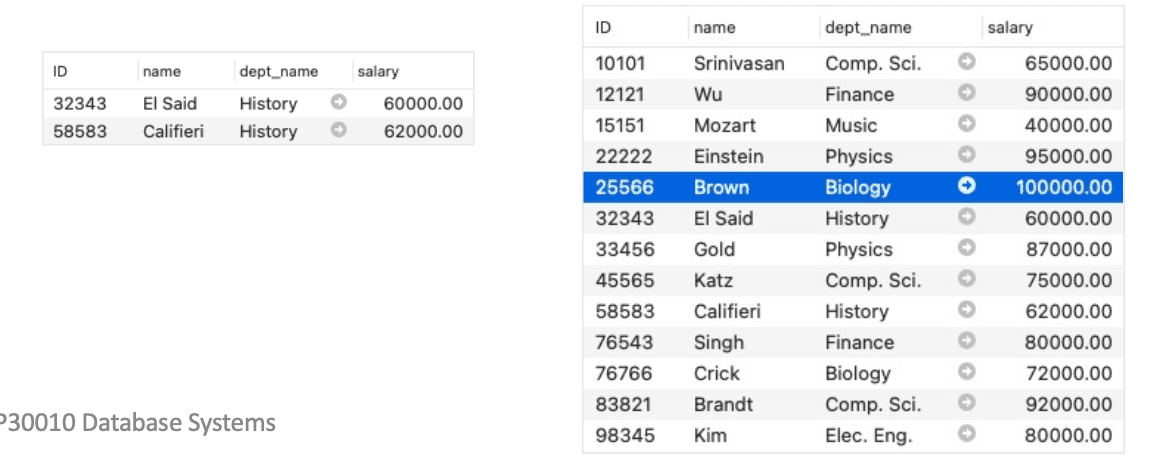
CREATE VIEW history_instructors AS SELECT * FROM instructor WHERE dept_name = 'History';
What happens if one inserts ('25566', 'Brown', 'Biology', 100000) into history_instructors?
INSERT INTO history_instructors VALUES ('25566', 'Brown', 'Biology', 100000) (History 전공이 아닌 튜플을 삽입할 경우 무결성 문제 발생)
Update via a View (SQL Limitation)
Most SQL implementations allow updates only on simple views (대부분의 SQL 구현은 단순 뷰에만 업데이트 허용)
The FROM clause has only one database relation (FROM 절에 하나의 테이블만 있어야 함)
The SELECT clause contains only attribute names of the relation, and does not have any expressions, aggregates, or DISTINCT specification (SELECT 절에는 속성 이름만 포함되고, 식, 집계, DISTINCT는 없어야 함)
Any attribute not listed in the SELECT clause can be set to null (선택되지 않은 속성은 null로 설정됨)
The query does not have a GROUP BY or HAVING clause (GROUP BY 또는 HAVING 절이 없어야 함)
[2] Window functions (윈도우 함수)
Window Functions in SQL
First introduced to standard SQL in 2003 (2003년에 SQL 표준에 처음 도입됨)
Built-in functions that define the relationships between records (레코드 간의 관계를 정의하는 내장 함수)
“A window function performs a calculation across a set of table rows that are somehow related to the current row…Behind the scenes, the window function is able to access more than just the current row of the query result” (PostgreSQL)(“윈도우 함수는 현재 행과 관련된 일련의 테이블 행에 걸쳐 계산을 수행하며, 현재 행 외의 다른 행에도 접근할 수 있다” – PostgreSQL)
One can find ranks, percentiles, sums/averages, row numbers, etc. (순위, 백분위수, 합/평균, 행 번호 등을 구할 수 있다)
For aggregation functions, one can implement moving sums, moving averages, etc. (집계 함수로 이동 합계, 이동 평균 등을 구현할 수 있다)
One can change the window sizes using the WINDOW_FUNCTION clause (WINDOW_FUNCTION 절을 통해 윈도우 크기를 변경할 수 있다)
Cannot be used together with a GROUP BY clause (GROUP BY 절과는 함께 사용할 수 없다)
Both PARTITION and GROUP BY partition the data and compute some statistics (PARTITION과 GROUP BY는 모두 데이터를 분할하고 통계를 계산한다)
Does not reduce the number of records in the result (결과의 레코드 수를 줄이지 않는다)
Window Functions in SQL
Window function types (윈도우 함수의 종류)
Aggregate window functions (집계 윈도우 함수):SUM(), MAX(), MIN(), AVG(), COUNT(), …
Ranking window functions (순위 윈도우 함수):RANK(), DENSE_RANK(), PERCENT_RANK(), ROW_NUMBER(), NTILE(), CUME_DIST(), NTH_VALUE()
Value window functions (값 기반 윈도우 함수):LAG(), LEAD(), FIRST_VALUE(), LAST_VALUE()
Window Functions in SQL
Syntax (문법)SELECT WINDOW_FUNCTION ( [ ALL ] expression )OVER ( [ PARTITION BY partition_list ] [ ORDER BY order_list] )FROM table;
WINDOW_FUNCTION: Specify the name of the window function (윈도우 함수 이름을 지정)
ALL (optional): When you will include ALL it will count all values including duplicates (ALL을 사용하면 중복 포함 전부 계산됨)
C.f., DISTINCT is not supported in window functions (참고: 윈도우 함수는 DISTINCT를 지원하지 않음)
OVER: Specifies the window clauses for aggregate functions (집계 함수의 윈도우 절 지정)
PARTITION BY partition_list: Defines the window (set of rows on which window function operates) for window functions (윈도우 함수가 작동할 행 집합을 정의)
If PARTITION BY is not specified, grouping will be done on entire table and values will be aggregated accordingly (PARTITION BY가 없으면 전체 테이블에 대해 작동)
ORDER BY order_list: Sorts the rows within each partition (각 파티션 내에서 정렬)
If ORDER BY is not specified, ORDER BY uses the entire table (ORDER BY가 없으면 전체 테이블 기준)
Running Examples
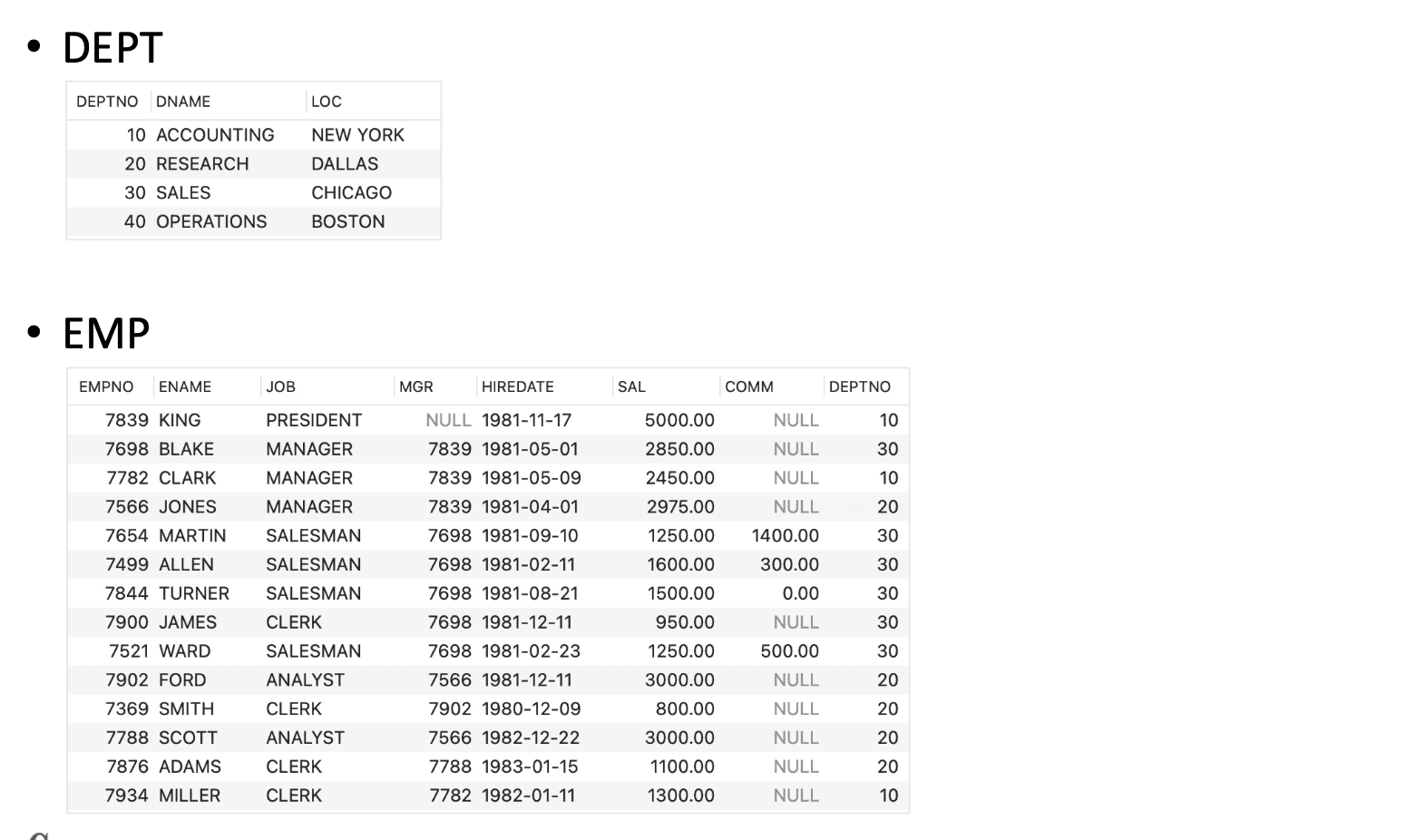
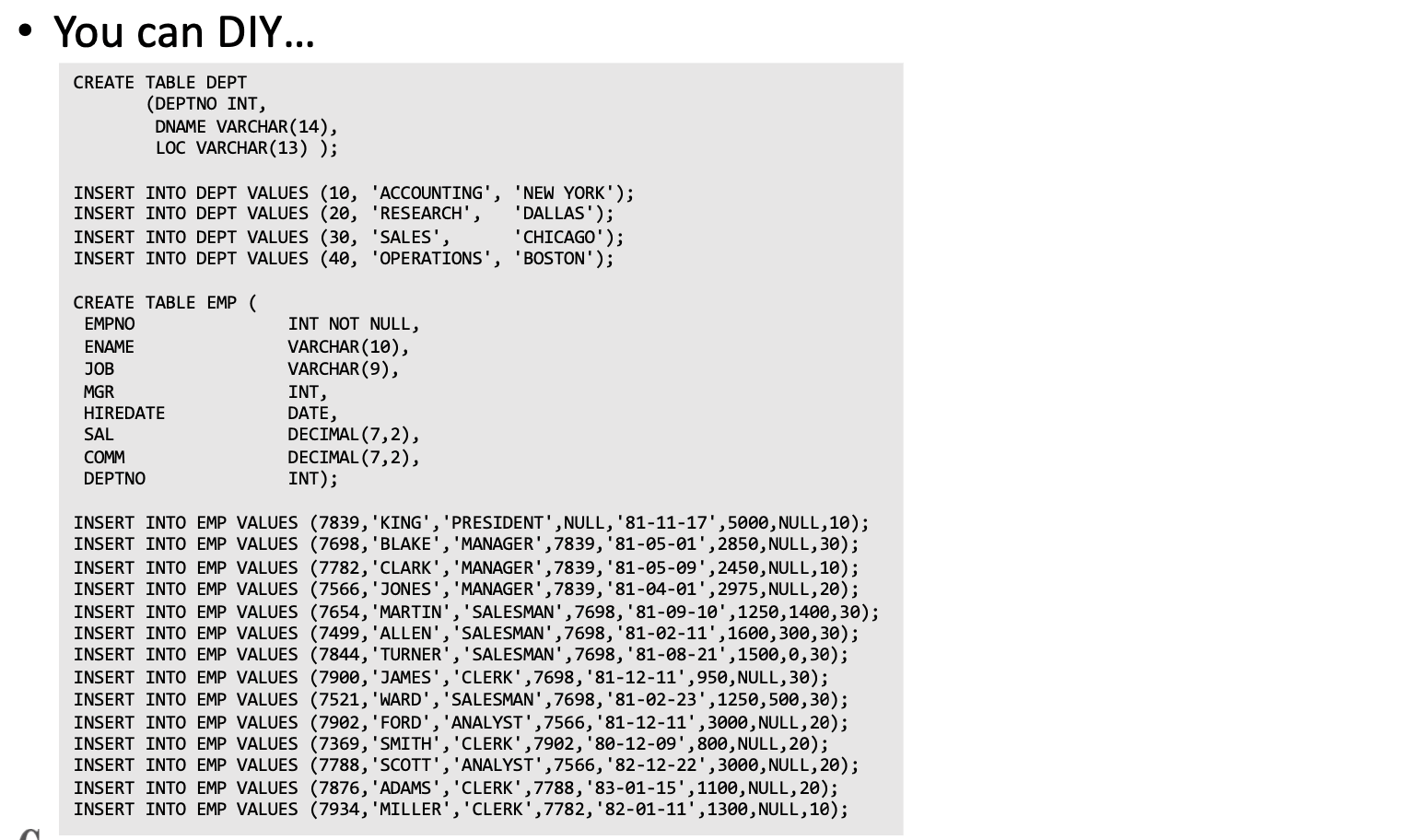
Aggregation Example
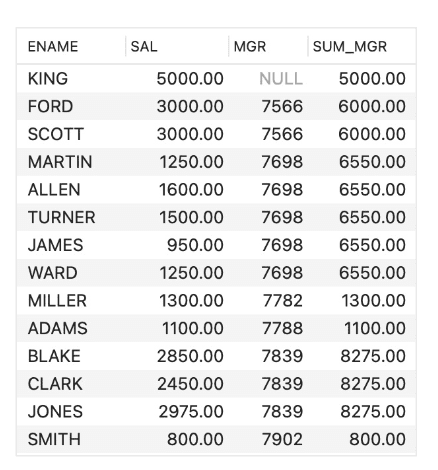
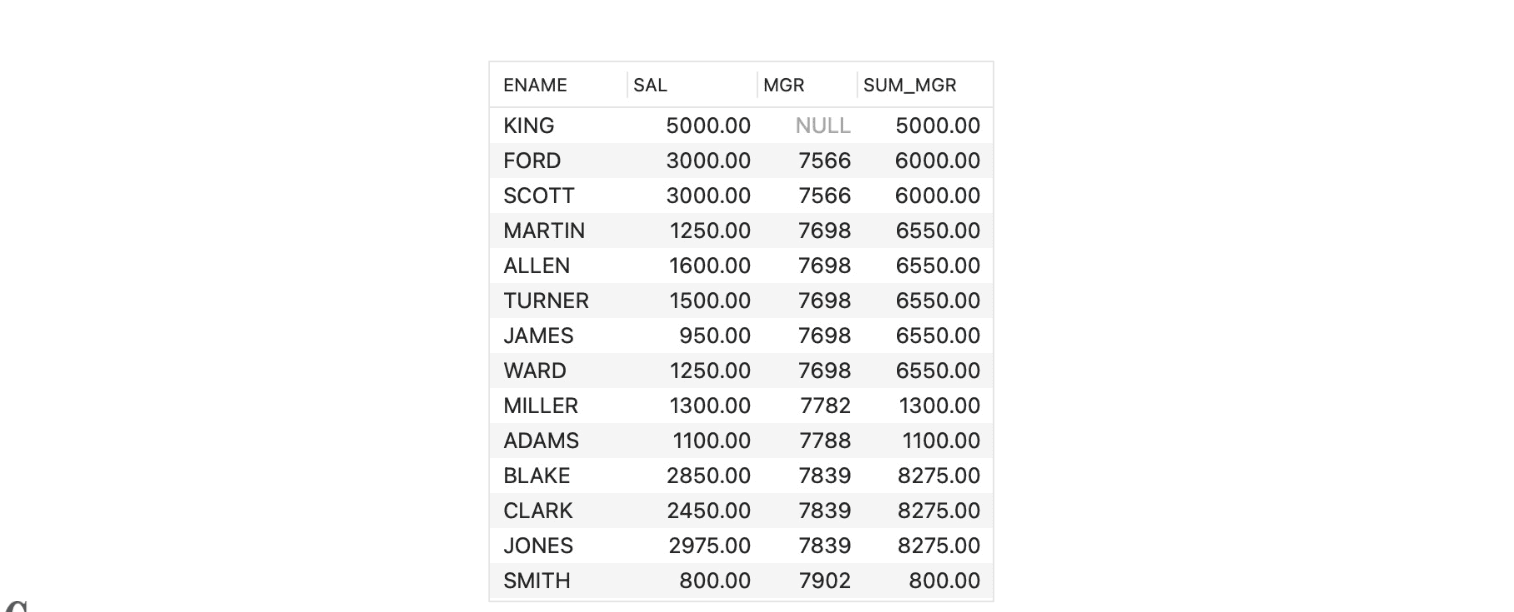
Sum over each manager (관리자별 합계)SELECT ENAME, SAL, MGR, SUM(SAL) OVER (PARTITION BY MGR) SUM_MGRFROM EMP;
SUM(SAL) OVER (PARTITION BY MGR)
: 같은 상사(MGR)를 가진 직원들의 급여 합계즉, 같은 관리자를 가진 직원들끼리 그룹 지어 그 안에서 급여(SAL)를 합산해서 SUM_MGR 컬럼에 보여준다.
Ranking Example
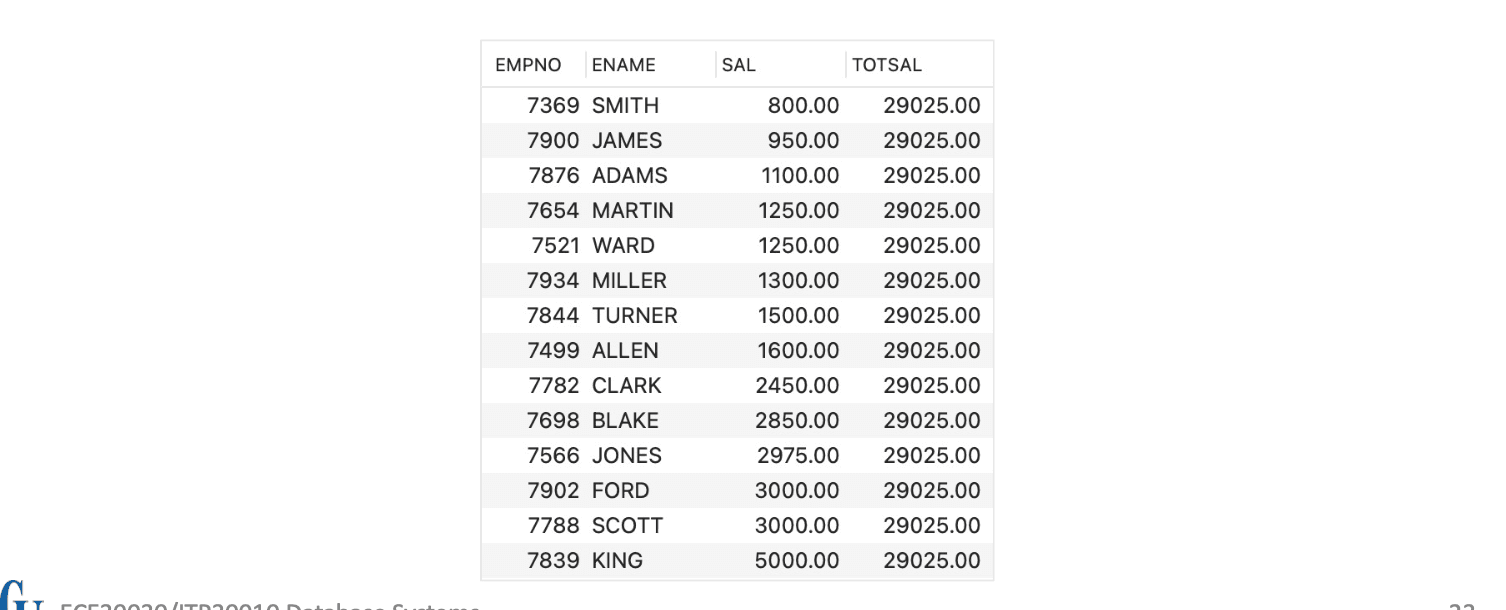
The base query: (기본 쿼리)SELECT EMPNO, ENAME, SAL, SUM(SAL) OVER(ORDER BY SAL ROWS BETWEEN UNBOUNDED PRECEDING AND UNBOUNDED FOLLOWING) TOTSALFROM EMP;
ROWS BETWEEN UNBOUNDED PRECEDING AND UNBOUNDED FOLLOWING
현재 행 기준으로:
맨 앞(가장 처음)부터
맨 끝(가장 마지막)까지의 모든 행을 포함
즉, 전체 테이블의 SAL 합계를 모든 행에 동일하게 보여줌
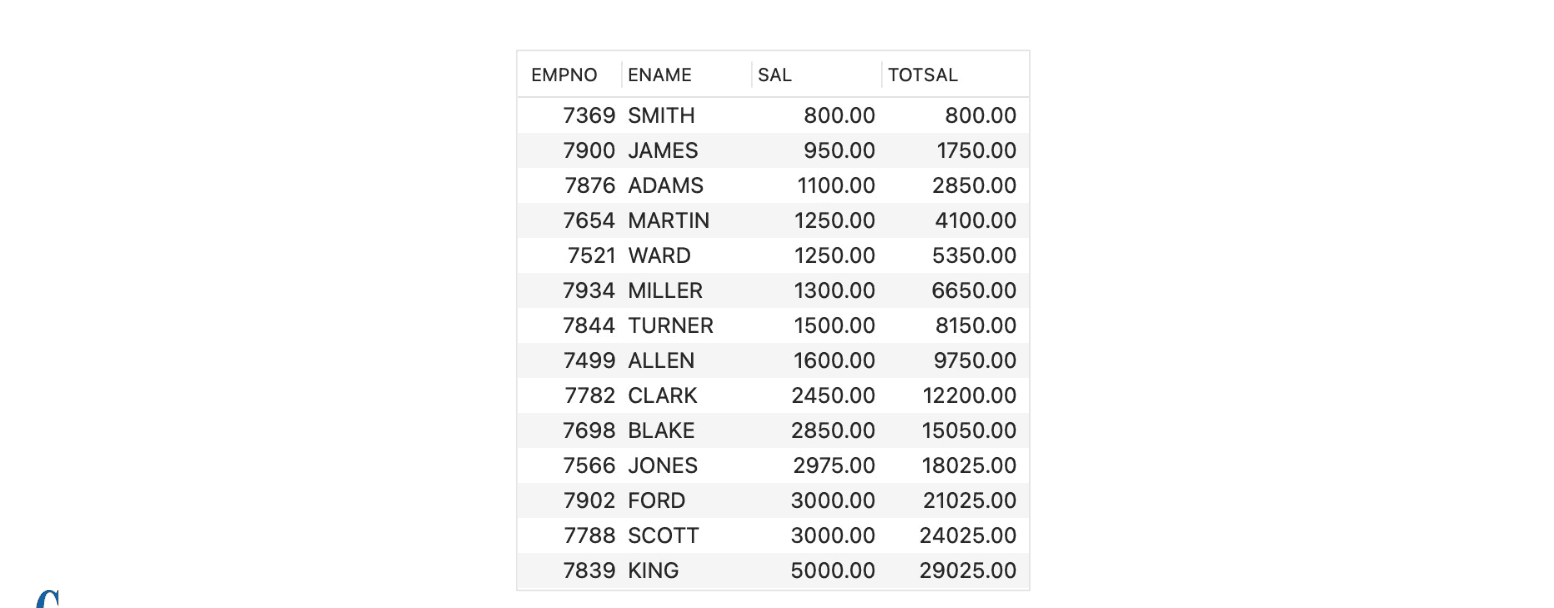
A cumulative sum: (누적 합계)SELECT EMPNO, ENAME, SAL, SUM(SAL) OVER(ORDER BY SAL ROWS BETWEEN UNBOUNDED PRECEDING AND CURRENT ROW) TOTSALFROM EMP;
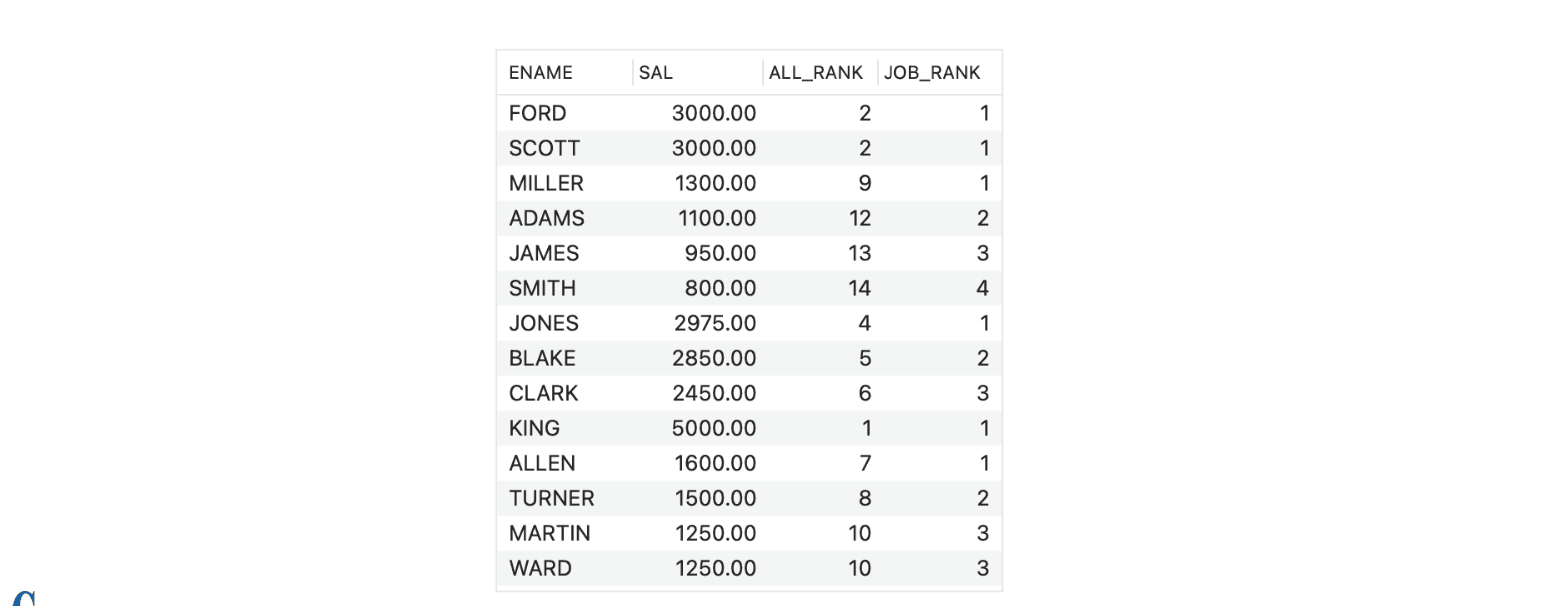
A table with the total rank and partitioned rank: (전체 순위와 파티션별 순위를 보여주는 테이블)SELECT ENAME, SAL, RANK() OVER (ORDER BY SAL DESC) ALL_RANK, RANK() OVER (PARTITION BY JOB ORDER BY SAL DESC) JOB_RANKFROM EMP;
RANK() OVER (ORDER BY SAL DESC) : 전체 직원 중 급여 순위 (ALL_RANK)
RANK() OVER (PARTITION BY JOB ORDER BY SAL DESC) : 같은 직무(JOB) 내에서 급여 순위 (JOB_RANK)
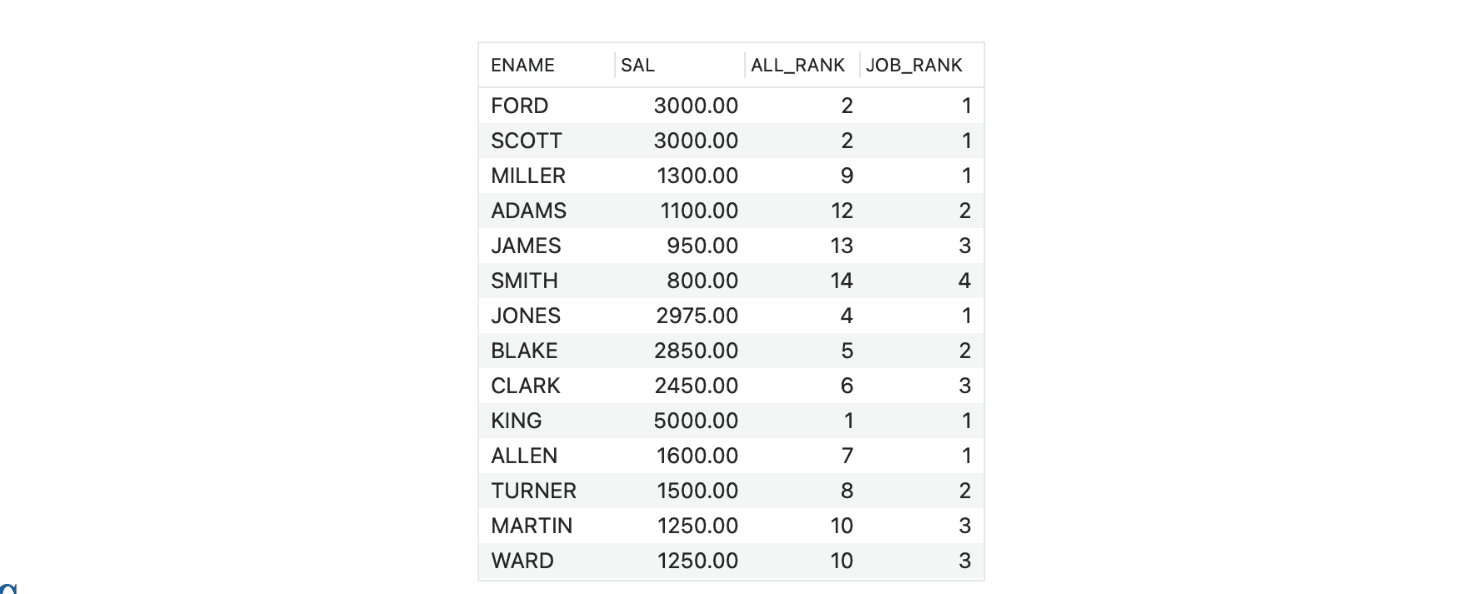
Using DENSE_RANK for partitioned rank (DENSE_RANK 사용 예시)SELECT ENAME, SAL, RANK() OVER (ORDER BY SAL DESC) ALL_RANK, DENSE_RANK() OVER (PARTITION BY JOB ORDER BY SAL DESC) JOB_RANKFROM EMP;
SCOTT, FORD는 급여가 같기 때문에 ALL_RANK는 2등이지만 다음 사람은 4등
JOB_RANK는 DENSE_RANK() 사용으로 인해 순위가 건너뛰지 않고 연속적
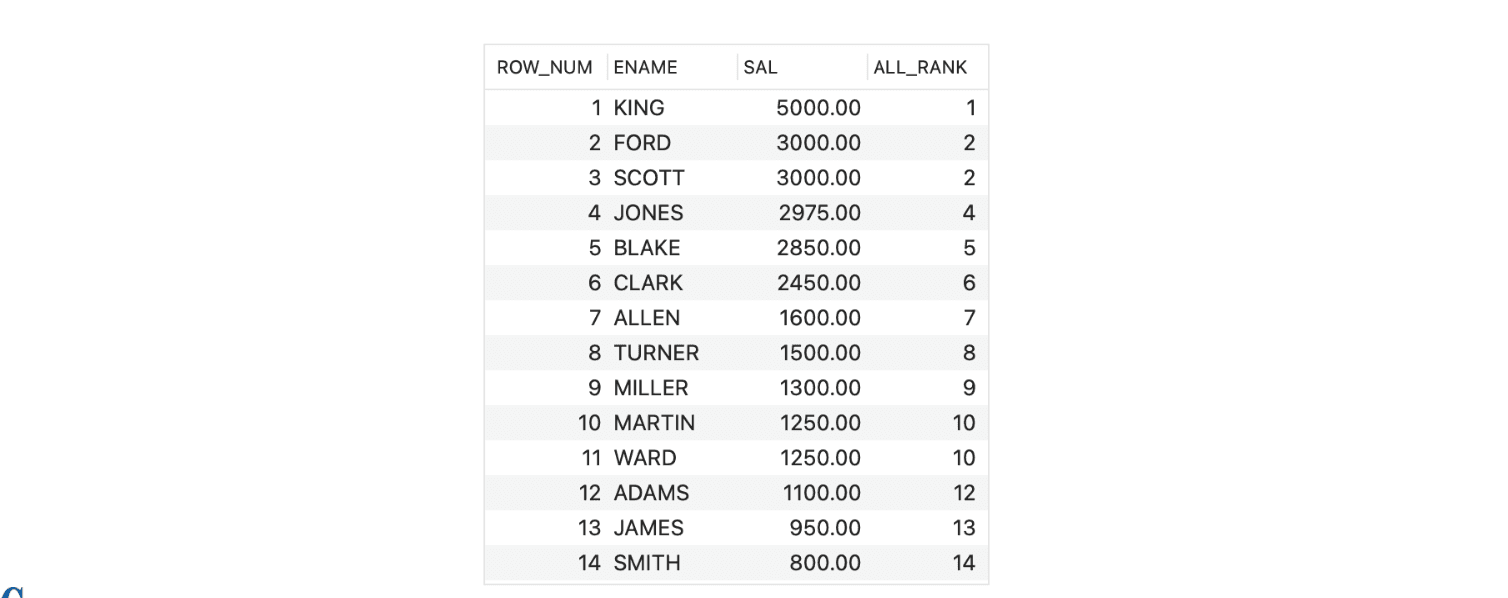
Using ROW_NUMBER (ROW_NUMBER 사용 예시)SELECT ROW_NUMBER() OVER (ORDER BY SAL DESC) ROW_NUM, ENAME, SAL, RANK() OVER (ORDER BY SAL DESC) ALL_RANKFROM EMP;
ROW_NUMBER()은 중복 급여가 있어도 무조건 다른 순번 부여
RANK()는 동점자에게는 같은 순위를 부여하고, 다음 순위는 건너뜀
따라서 ROW_NUM은 중복 없이 1~14까지,ALL_RANK는 동점자(예: 3000.00) 처리 때문에 1, 2, 2, 4...처럼 나옴
Aggregation Examples
Average over each job (직무별 평균)SELECT ENAME, SAL, JOB, AVG(SAL) OVER (PARTITION BY JOB) AS AVG_SAL_JOBFROM EMP;
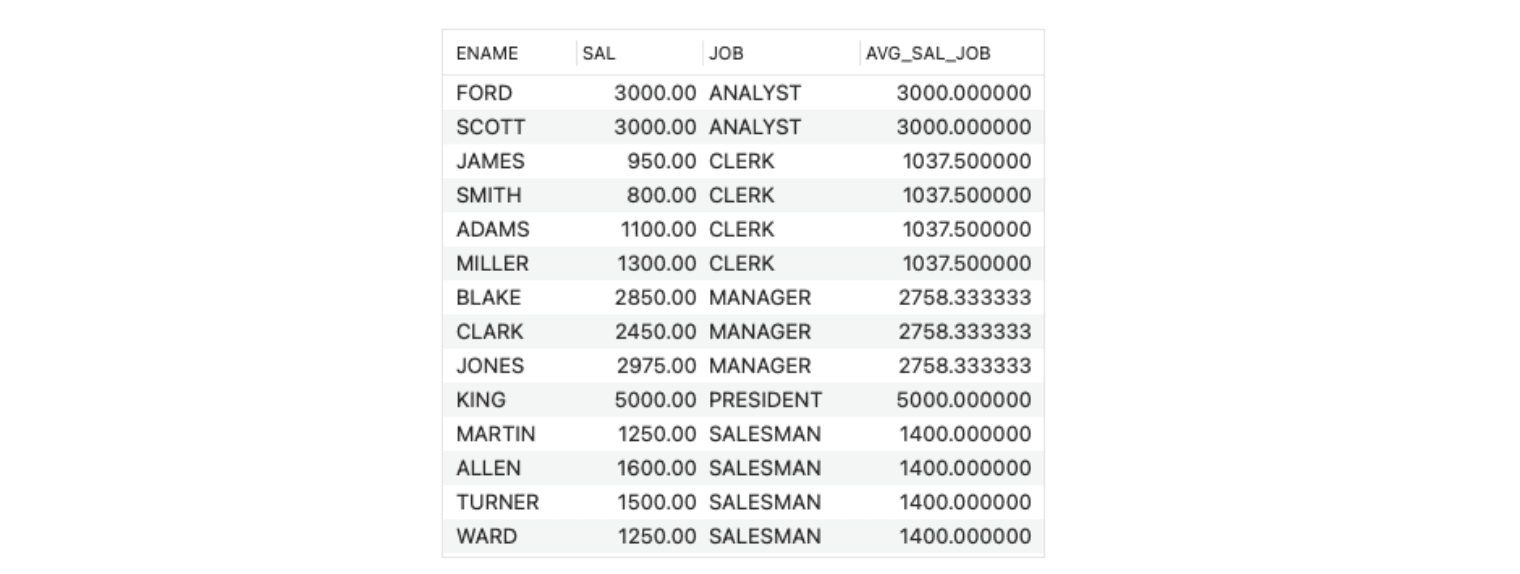
C.f., Aggregation over groups (GROUP BY를 이용한 집계 비교)SELECT JOB, AVG(SAL)FROM EMPGROUP BY JOB;

Sum over each manager (관리자별 합계 반복)SELECT ENAME, SAL, MGR, SUM(SAL) OVER (PARTITION BY MGR) AS SUM_MGRFROM EMP;
Nonaggregation Examples
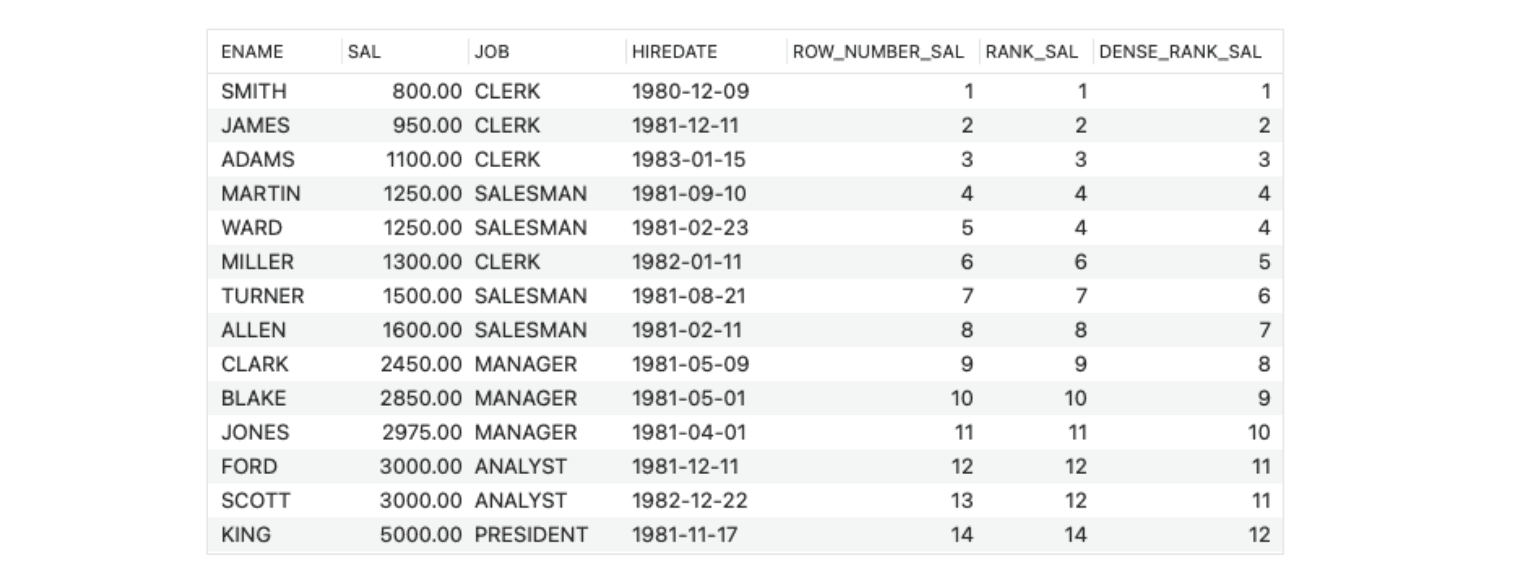
Rank by salary (급여 순위 매기기)SELECT ENAME, SAL, JOB, HIREDATE, ROW_NUMBER() OVER (ORDER BY SAL) AS ROW_NUMBER_SAL, RANK() OVER (ORDER BY SAL) AS RANK_SAL, DENSE_RANK() OVER (ORDER BY SAL) AS DENSE_RANK_SALFROM EMP;
ROW_NUMBER() 모든 행에 고유한 순번. 중복 무시.
RANK() 중복 순위 인정, 다음 순위는 건너뜀 (희소 순위).
DENSE_RANK() 중복 순위 인정, 다음 순위는 연속 (조밀 순위).
정렬 기준 급여(SAL) 오름차순 기준으로 정렬됨.
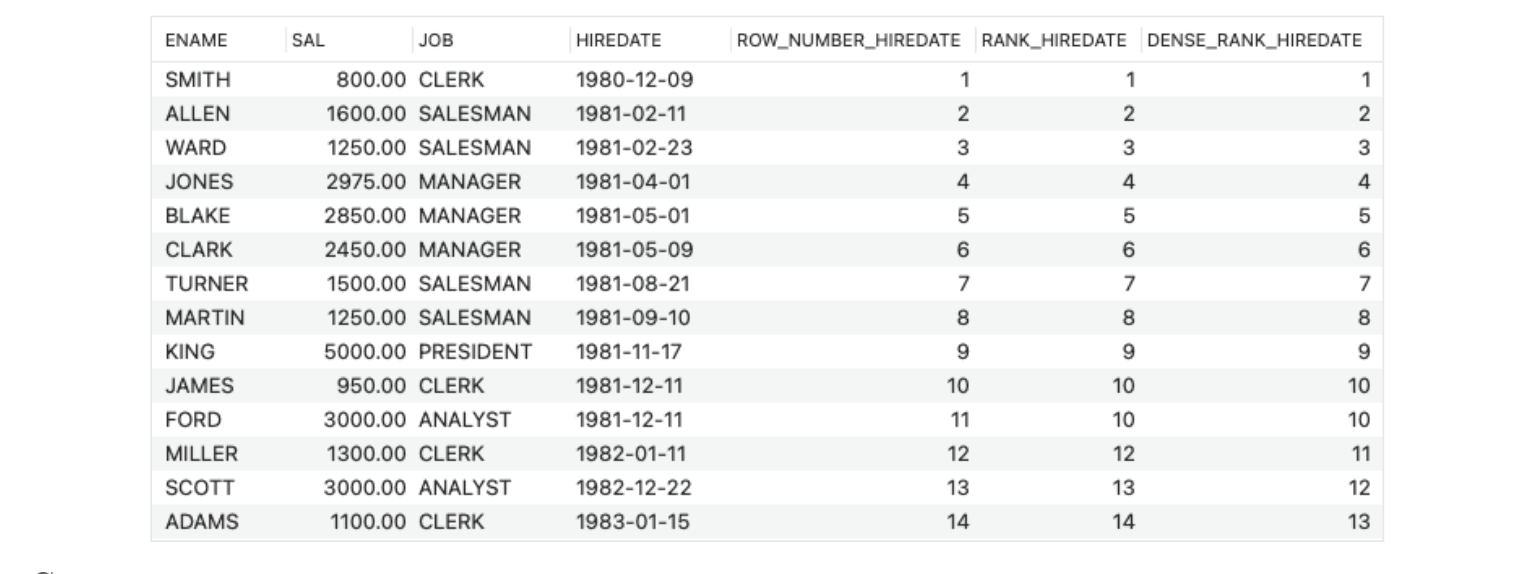
Rank by hiredate (입사일 기준 순위)SELECT ENAME, SAL, JOB, HIREDATE, ROW_NUMBER() OVER (ORDER BY HIREDATE) AS ROW_NUMBER_HIREDATE, RANK() OVER (ORDER BY HIREDATE) AS RANK_HIREDATE, DENSE_RANK() OVER (ORDER BY HIREDATE) AS DENSE_RANK_HIREDATEFROM EMP;
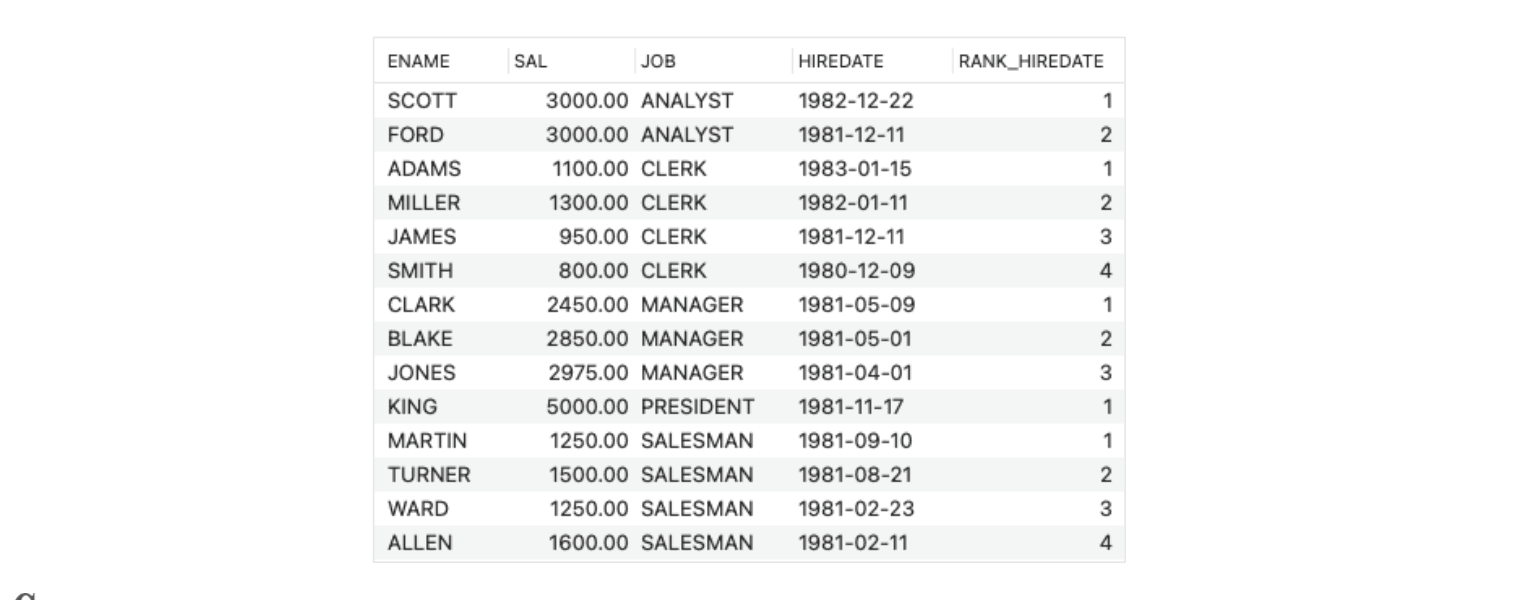
Rank by hiredate within each job (직무 내 입사일 기준 순위)SELECT ENAME, SAL, JOB, HIREDATE, RANK() OVER (PARTITION BY JOB ORDER BY HIREDATE DESC) AS RANK_HIREDATEFROM EMP;
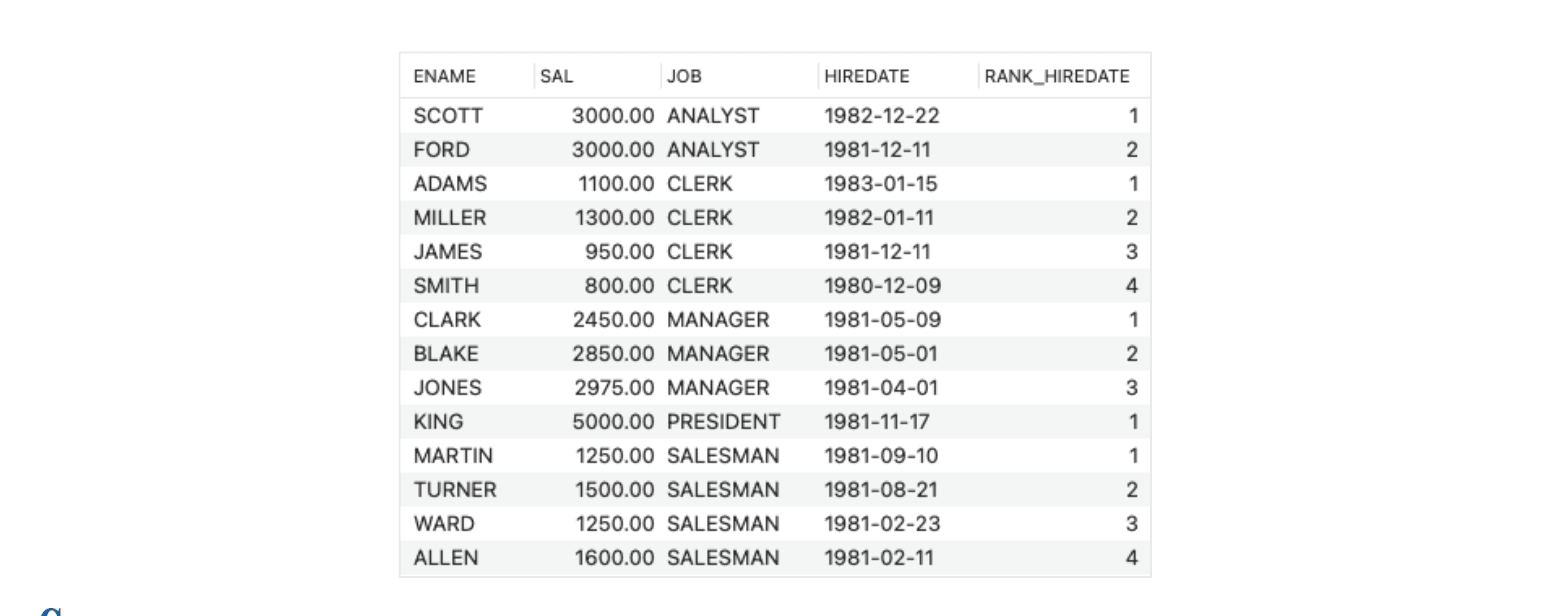
Same as above using WINDOW clause (WINDOW 절을 사용한 동일 예시)SELECT ENAME, SAL, JOB, HIREDATE, RANK() OVER w AS RANK_HIREDATEFROM EMPWINDOW w AS (PARTITION BY JOB ORDER BY HIREDATE DESC);
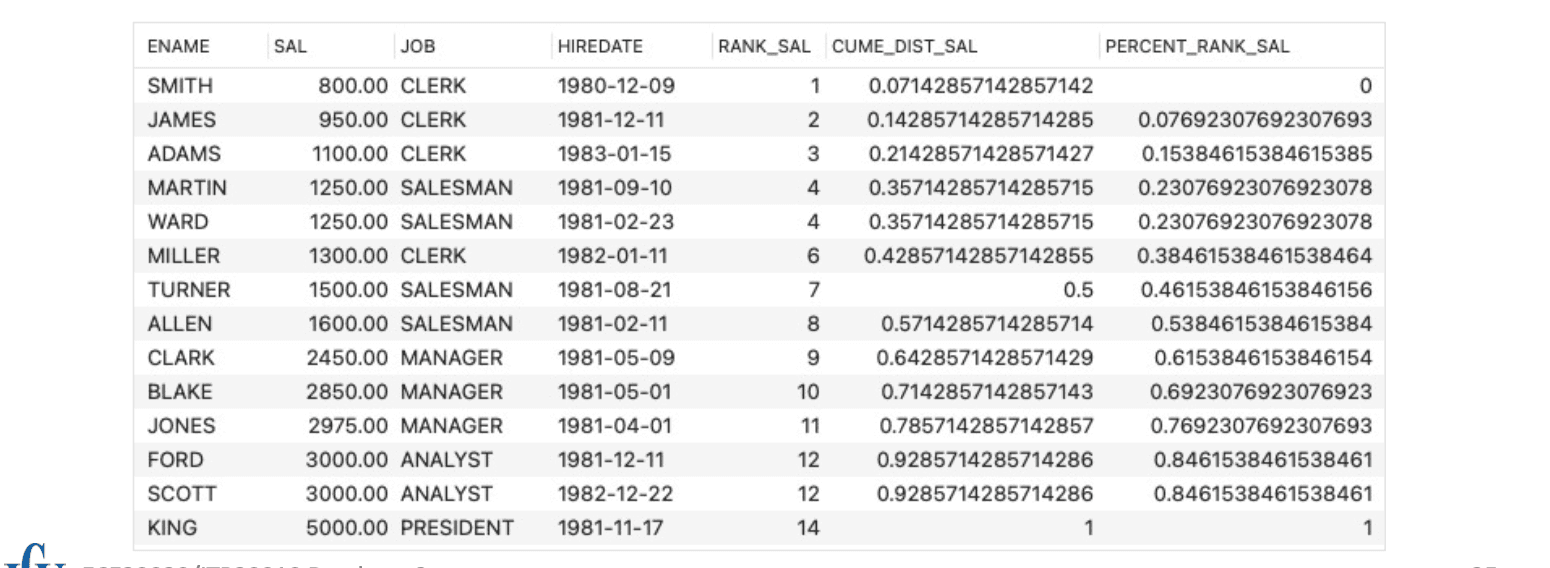
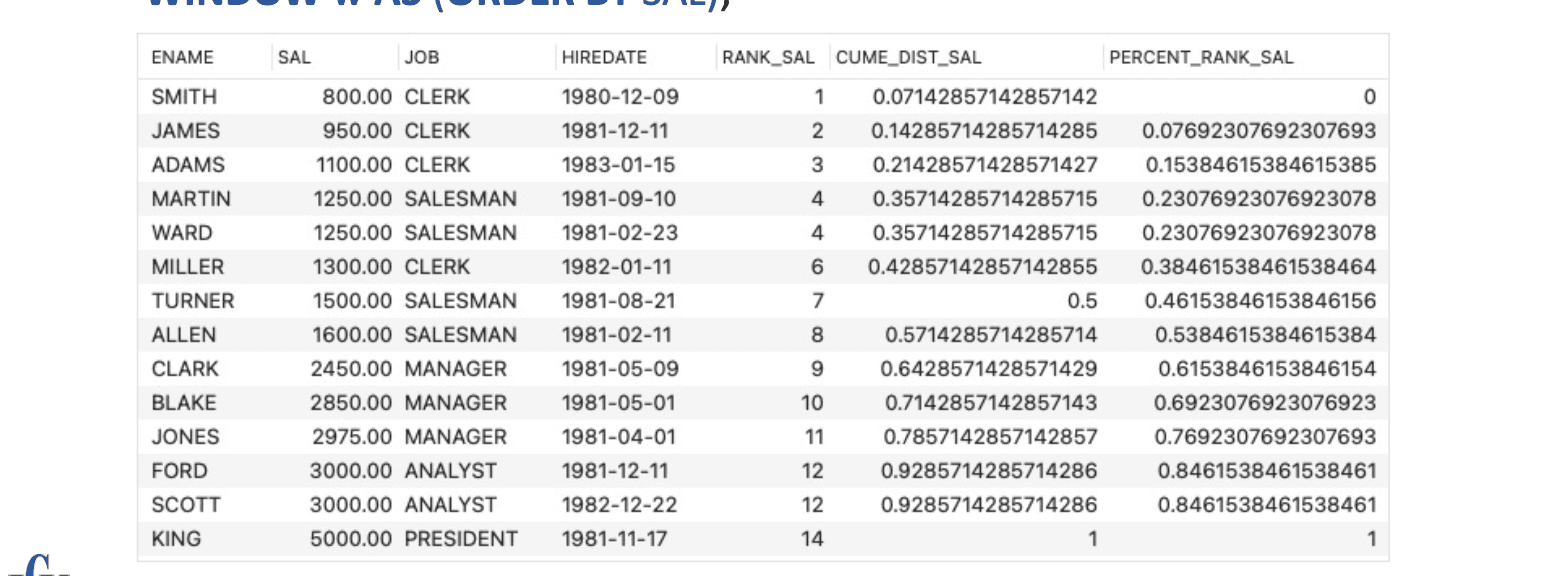
Percentile by salary (급여 기준 백분위수)SELECT ENAME, SAL, JOB, HIREDATE, RANK() OVER (ORDER BY SAL) AS RANK_SAL, CUME_DIST() OVER (ORDER BY SAL) AS CUME_DIST_SAL, PERCENT_RANK() OVER (ORDER BY SAL) AS PERCENT_RANK_SALFROM EMP;
Same as above using WINDOW clause (WINDOW 절을 사용한 동일 예시)SELECT ENAME, SAL, JOB, HIREDATE, RANK() OVER w AS RANK_SAL, CUME_DIST() OVER w AS CUME_DIST_SAL, PERCENT_RANK() OVER w AS PERCENT_RANK_SALFROM EMPWINDOW w AS (ORDER BY SAL);
Running Examples
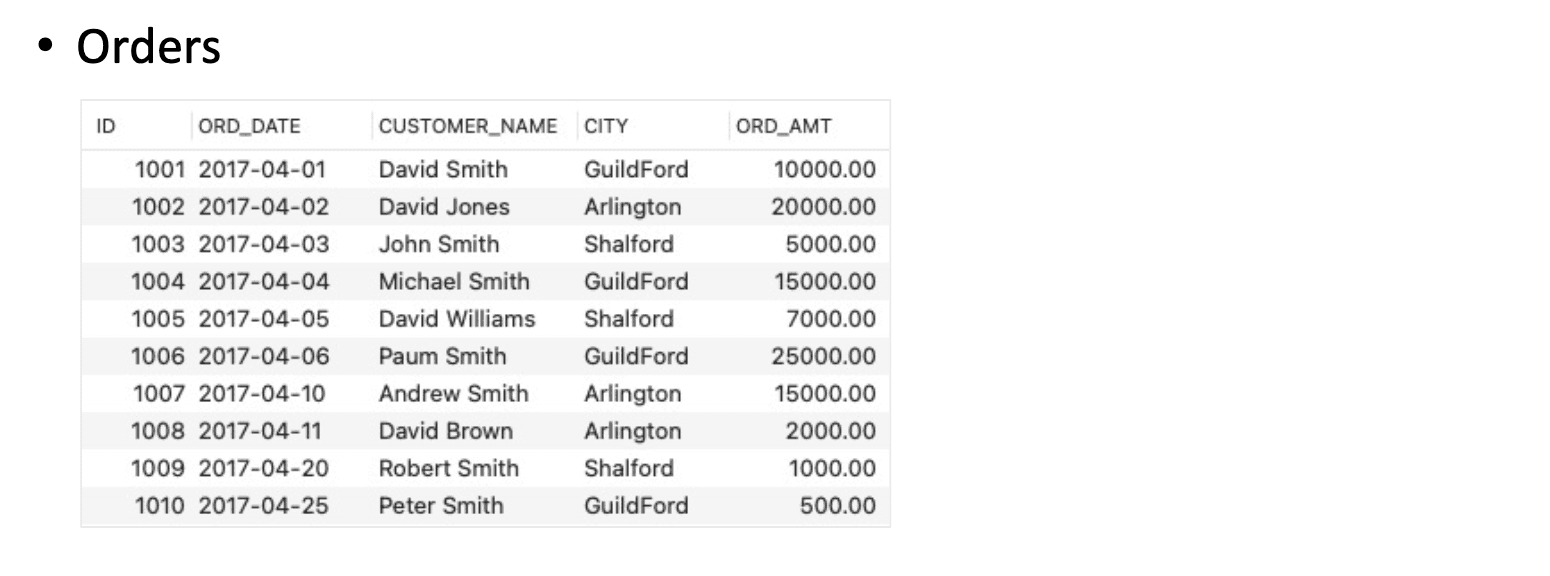
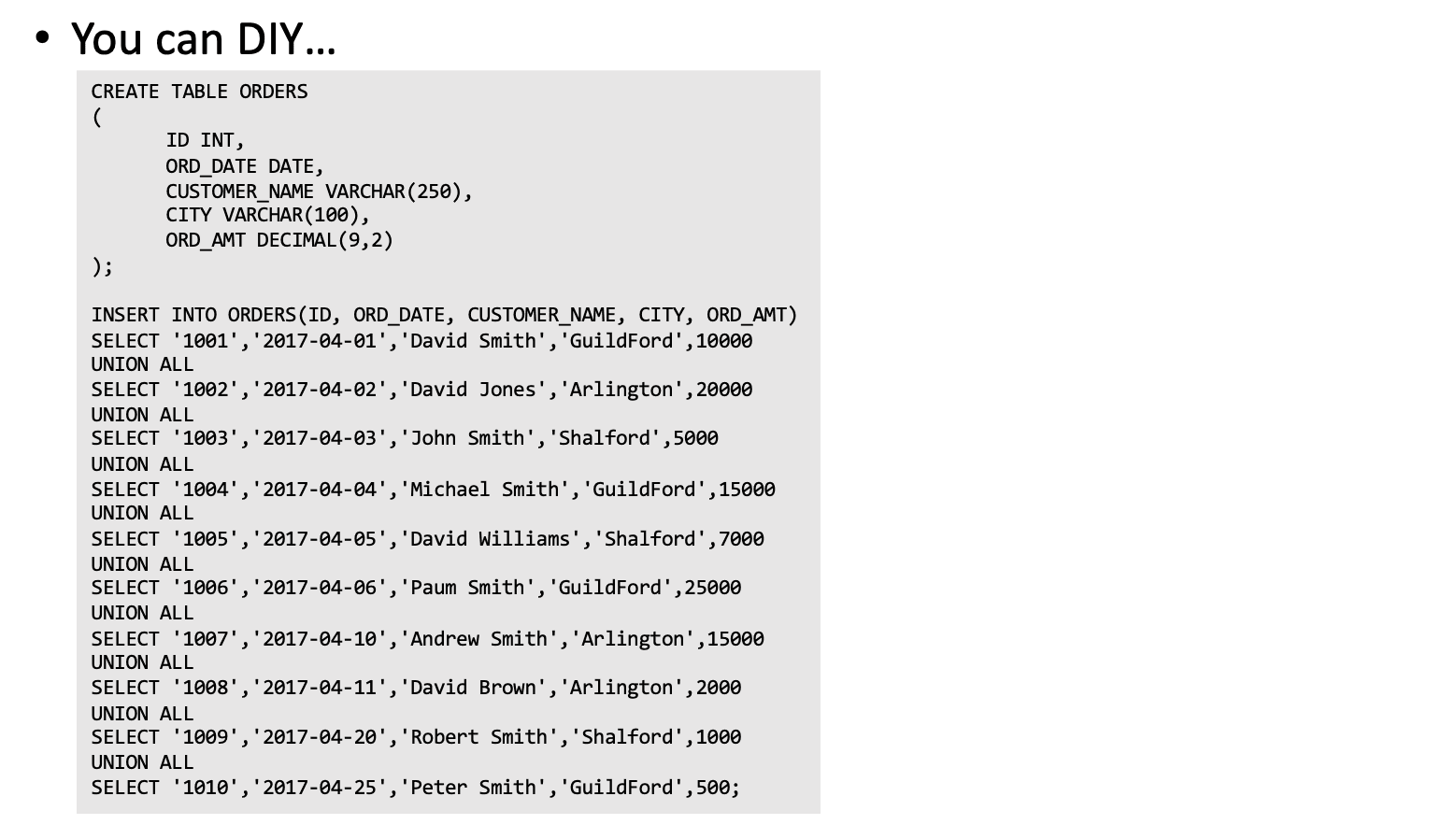
Value Window Examples
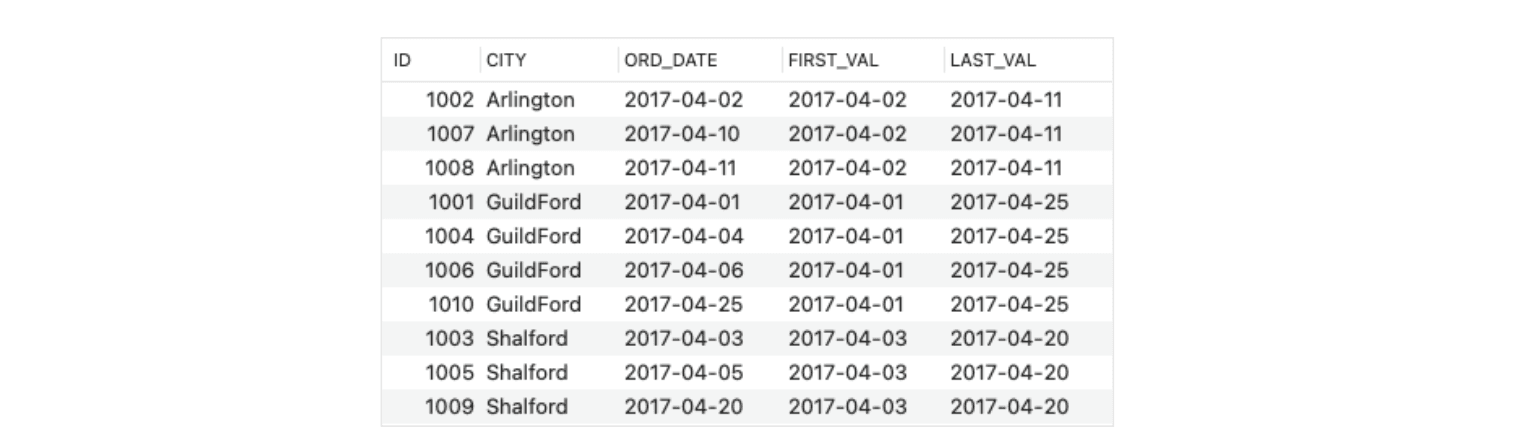
First and last records in each partition (각 도시 파티션에서 첫/마지막 주문 날짜)SELECT ID, CITY, ORD_DATE, FIRST_VALUE(ORD_DATE) OVER(PARTITION BY CITY) AS FIRST_VAL, LAST_VALUE(ORD_DATE) OVER(PARTITION BY CITY) AS LAST_VALFROM ORDERS;
FIRST_VALUE(column) : 윈도우(파티션) 내 가장 첫 번째 값
LAST_VALUE(column) : 윈도우 내 가장 마지막 값 (기본적으로 "현재까지" 기준이므로 주의 필요)
PARTITION BY CITY : 도시별 그룹화, 각 도시(CITY)별로 따로 윈도우 계산
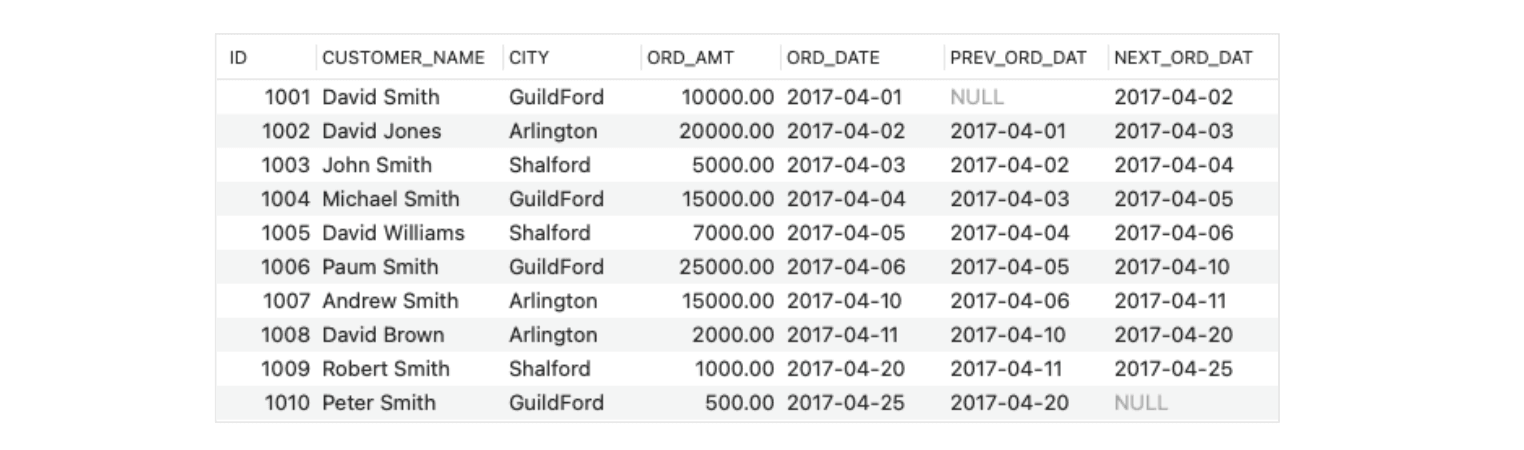
First and last records in each partition (각 도시 파티션에서 첫/마지막 주문 날짜)SELECT ID, CUSTOMER_NAME, CITY, ORD_AMT, ORD_DATE, LAG(ORD_DATE,1) OVER(ORDER BY ORD_DATE) AS PREV_ORD_DAT, LEAD(ORD_DATE,1) OVER(ORDER BY ORD_DATE) AS NEXT_ORD_DATFROM ORDERS;
LAG(column, offset) : 현재 행 기준으로 이전 행의 값 가져오기
LEAD(column, offset) : 현재 행 기준으로 다음 행의 값 가져오기
OVER (ORDER BY ORD_DATE) : 주문 날짜 기준으로 정렬하여 순서를 정의
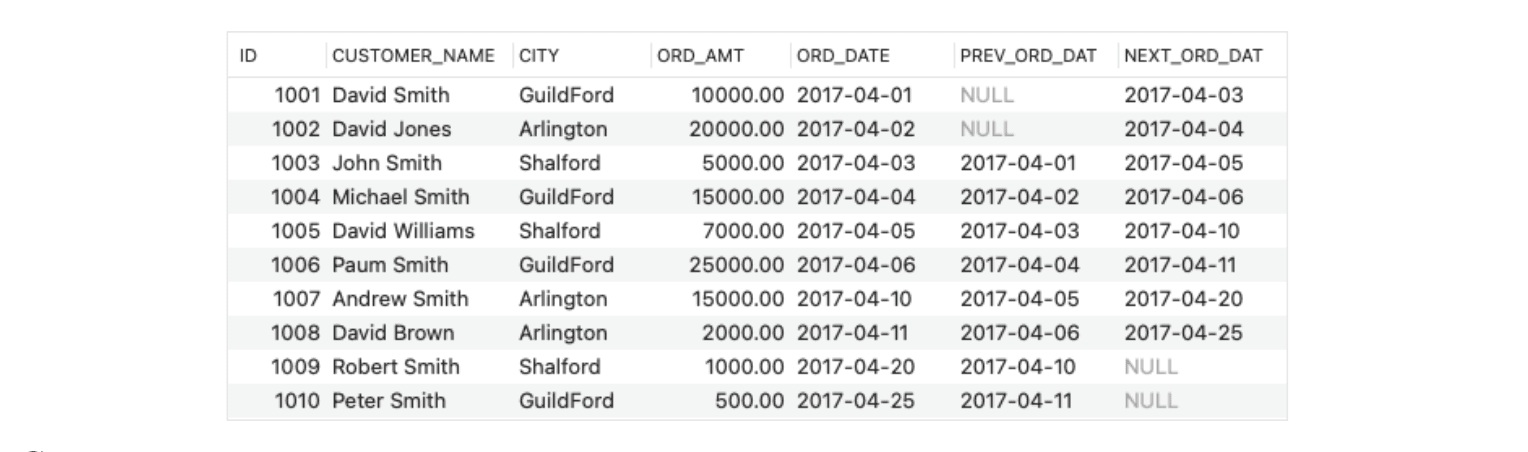
First and last records in each partition (각 도시 파티션에서 첫/마지막 주문 날짜)SELECT ID, CUSTOMER_NAME, CITY, ORD_AMT, ORD_DATE, LAG(ORD_DATE,2) OVER(ORDER BY ORD_DATE) AS PREV_ORD_DAT, LEAD(ORD_DATE,2) OVER(ORDER BY ORD_DATE) AS NEXT_ORD_DATFROM ORDERS;
Frame Specification
A frame is a subset of the current partition, and the frame clause specifies how to define the subset (프레임은 현재 파티션의 부분집합이며, 프레임 절은 이 부분집합을 어떻게 정의할지 명시한다)
Frames are determined with respect to the current row (프레임은 현재 행을 기준으로 정의된다)
By defining a frame to be all rows from the partition start to the current row, one can compute running totals for each row (프레임을 파티션의 시작부터 현재 행까지로 설정하면 각 행에 대한 누적 합계를 계산할 수 있다)
By defining a frame as extending N rows on either side of the current row, one can compute rolling averages (프레임을 현재 행을 중심으로 N개의 행까지 확장하면 이동 평균을 계산할 수 있다)
ROWS: The frame is defined by beginning and ending row positions (physical window) (ROWS: 프레임은 시작 및 종료 행의 위치로 정의됨 — 물리적 윈도우)
RANGE: The frame is defined by rows within a value range (logical window) (RANGE: 프레임은 값의 범위 내에 있는 행들로 정의됨 — 논리적 윈도우)
BETWEEN … AND …: Specify both frame endpoints (BETWEEN … AND …: 프레임의 시작점과 끝점을 모두 명시함)
UNBOUNDED PRECEDING: The bound is the first partition row (UNBOUNDED PRECEDING: 프레임의 시작은 파티션의 첫 번째 행)
UNBOUNDED FOLLOWING: The bound is the last partition row (UNBOUNDED FOLLOWING: 프레임의 끝은 파티션의 마지막 행)
CURRENT ROW: For ROWS, the bound is the current row; For RANGE, the bound is the peers of the current row (CURRENT ROW: ROWS에서는 현재 행이 경계, RANGE에서는 현재 행과 같은 값을 가진 행들이 경계)
Frame Specification Examples
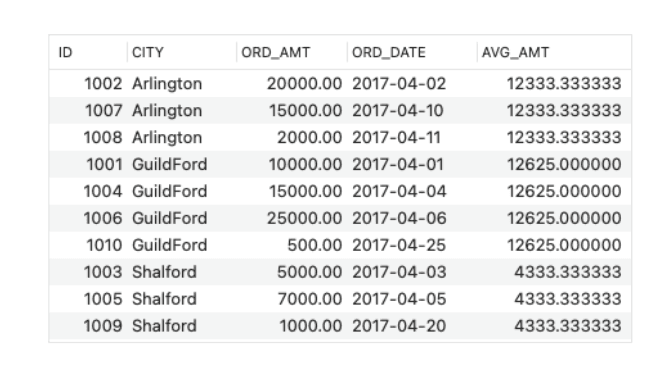
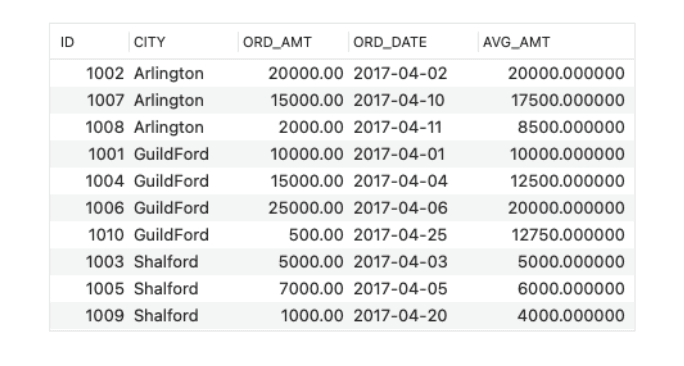
Sum over each partition (파티션 전체 합계)SELECT ID, CITY, ORD_AMT, ORD_DATE, AVG(ORD_AMT) OVER(PARTITION BY CITY ORDER BY ORD_DATE ROWS BETWEEN UNBOUNDED PRECEDING AND UNBOUNDED FOLLOWING ) AS AVG_AMTFROM ORDERS;
A 2-record moving average (2개 이동 평균)SELECT ID, CITY, ORD_AMT, ORD_DATE, AVG(ORD_AMT) OVER(PARTITION BY CITY ORDER BY ORD_DATE ROWS BETWEEN 1 PRECEDING AND 0 FOLLOWING ) AS AVG_AMTFROM ORDERS;
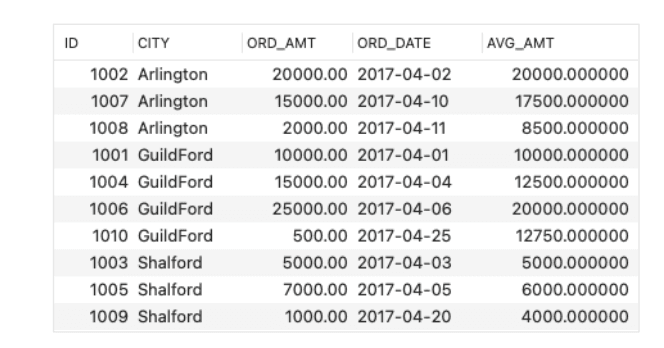
2-record moving average with CURRENT ROW (현재 행까지 포함한 평균)SELECT ID, CITY, ORD_AMT, ORD_DATE, AVG(ORD_AMT) OVER(PARTITION BY CITY ORDER BY ORD_DATE ROWS BETWEEN 1 PRECEDING AND CURRENT ROW ) AS AVG_AMTFROM ORDERS;
ROWS BETWEEN 1 PRECEDING AND CURRENT ROW : 현재 행 포함 + 바로 이전 행 포함 (2개 행 기준 평균)
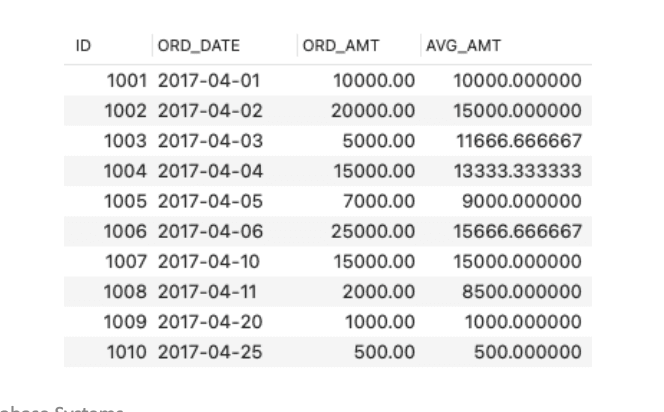
A 3-day moving average (3일 이동 평균)SELECT ID, ORD_DATE, ORD_AMT, AVG(ORD_AMT) OVER(ORDER BY ORD_DATE RANGE BETWEEN INTERVAL 2 DAY PRECEDING AND CURRENT ROW ) AS AVG_AMTFROM ORDERS;
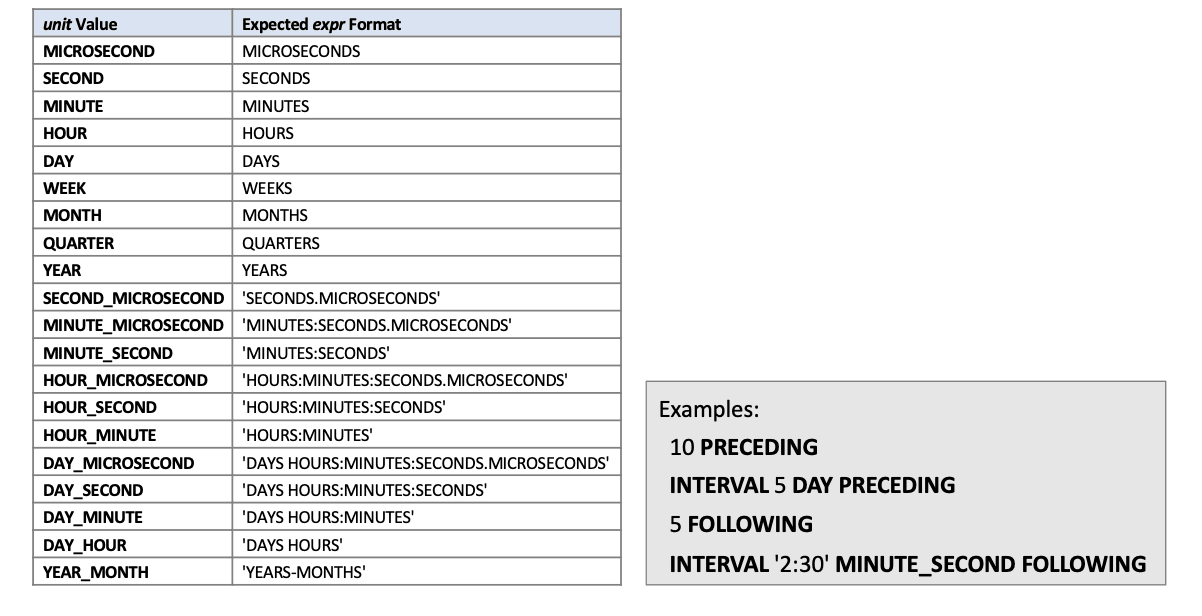
Valid units for INTERVAL (INTERVAL의 유효 단위들 – 예: DAY, MONTH 등)
[3] Keys
Keys
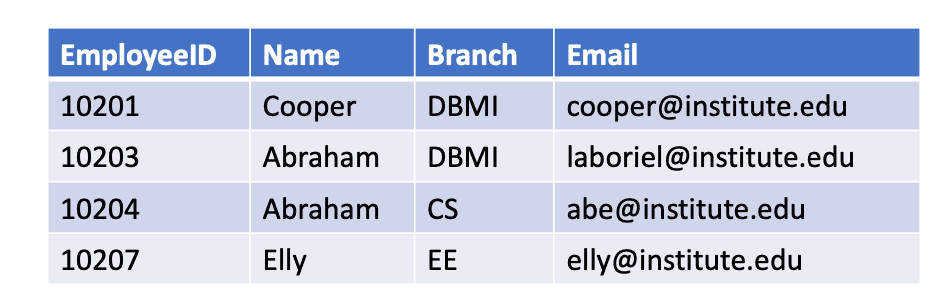
Key: An attribute or a set of attributes, which help(s) uniquely identify a tuple of data in a relation(키: 릴레이션에서 하나의 튜플을 고유하게 식별할 수 있도록 돕는 속성 또는 속성들의 집합)
Why we need keys? (왜 키가 필요한가?)
To force identity of data (데이터의 고유성을 강제하기 위해)
To ensure integrity of data is maintained (데이터의 무결성을 유지하기 위해)
To establish relationship between relations (릴레이션 간 관계를 설정하기 위해)
Types of Keys (키의 종류)
Super key (슈퍼 키)
Candidate key (후보 키)
Primary key (기본 키)
Alternate key (대체 키)
Foreign key (외래 키)
Composite key (복합 키)
Compound key (결합 키)
Surrogate key (대리 키)
Super Keys
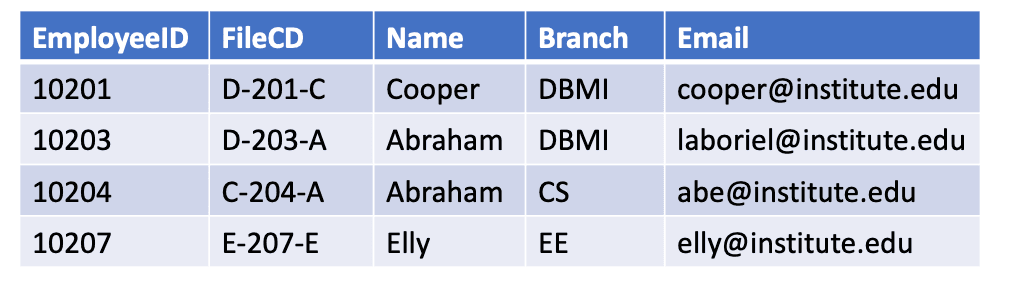
Any possible unique identifier (가능한 모든 고유 식별자)
Any attribute or any set of attributes that can be used to identify tuple of data in a relation(릴레이션의 튜플을 식별할 수 있는 속성 또는 속성의 집합)
Attributes with unique values (고유한 값을 가진 속성들)
Combinations of attributes (속성들의 조합)
E.g., (예시:)
{student_id}, {student_id, name}, {student_id, email} 등 모두 슈퍼 키가 될 수 있음
Candidate Keys
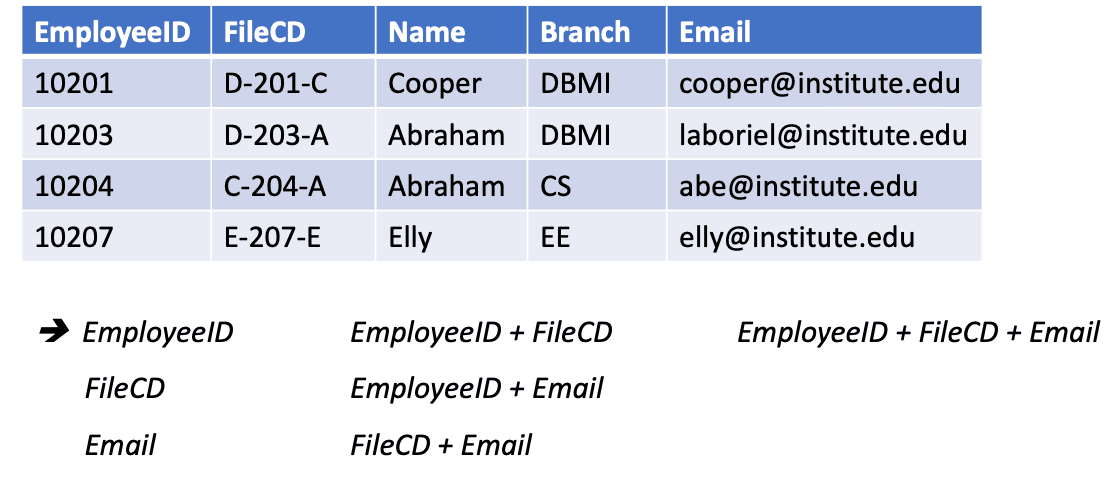
Minimal subset of super key (슈퍼 키의 최소 부분 집합)
If any proper subset of a super key is also a super key, then that (super key) cannot be a candidate key(슈퍼 키의 진부분집합도 슈퍼 키이면, 해당 슈퍼 키는 후보 키가 아님)
E.g., (예시:)
{student_id}은 후보 키, {student_id, name}은 후보 키가 아님 (불필요한 속성 포함)
Primary Keys (PKs)
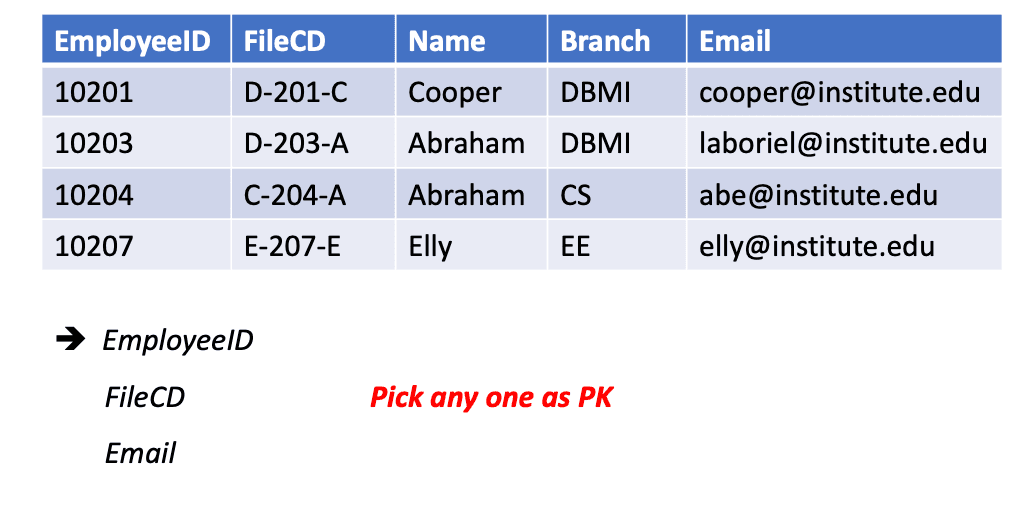
The candidate key chosen to uniquely identify each row of data in a relation(릴레이션에서 각 행을 고유하게 식별하기 위해 선택된 후보 키)
No two rows can have the same PK value (두 행이 같은 기본 키 값을 가질 수 없음)
PK value cannot be NULL (기본 키는 NULL일 수 없음 — 모든 행에 반드시 값이 있어야 함)
Alternate Keys
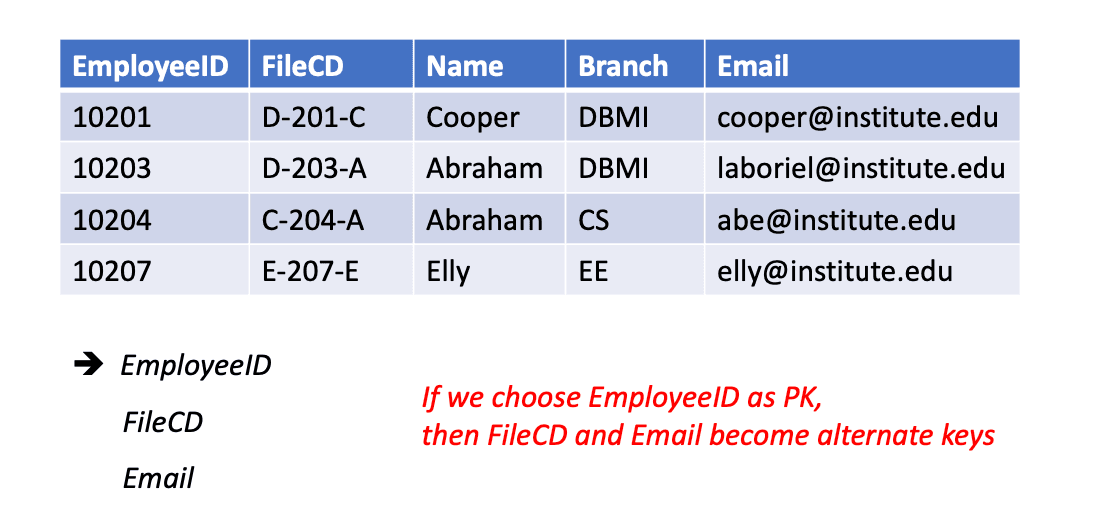
The candidate keys that are NOT chosen as PK in a relation(기본 키로 선택되지 않은 후보 키들)
Foreign Keys
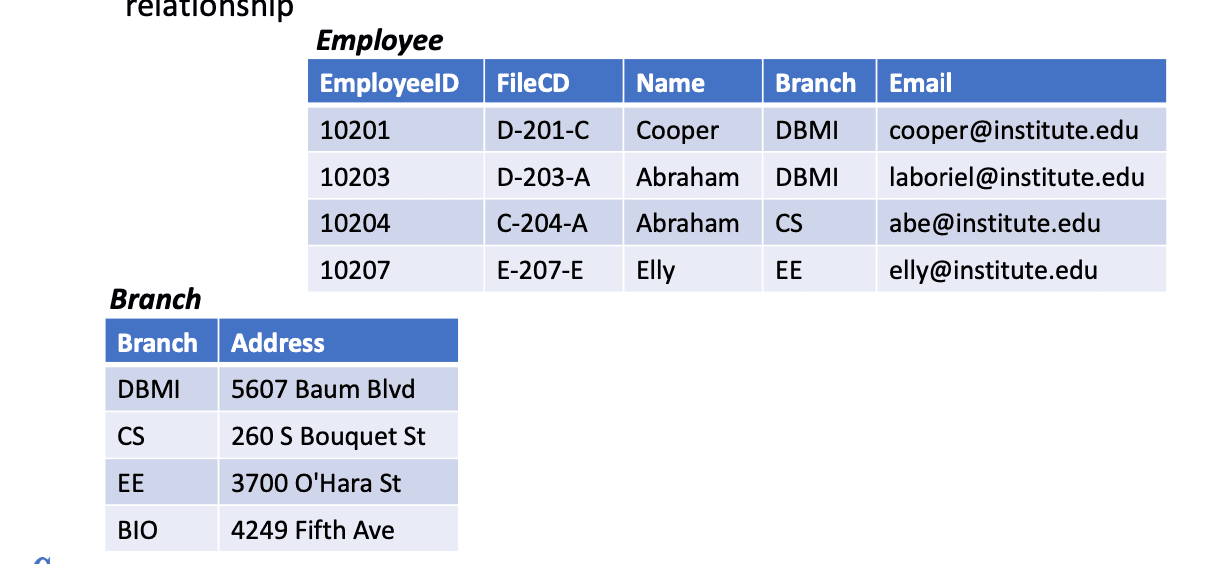
An attribute in a relation that is used to define its relationship with another relation(다른 릴레이션과의 관계를 정의하기 위해 사용되는 속성)
Using foreign key helps in maintaining data integrity for tables in relationship(외래 키를 사용하면 테이블 간 관계에서 데이터 무결성을 유지할 수 있음)
Composite & Compound Keys
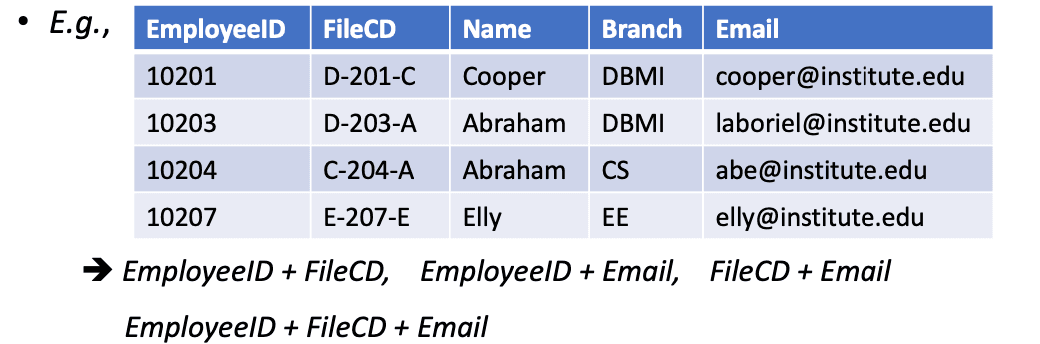
Composite key: Any key with more than one attribute(두 개 이상의 속성으로 구성된 키 = 복합 키)
Compound key: A composite key that has at least one attribute which is a foreign key(복합 키 중 하나 이상의 속성이 외래 키인 경우 = 결합 키)
E.g., Let us assume that we have defined a composite key (FileCD, Branch), it is also a compound key (considering the Branch table)(예: (FileCD, Branch)라는 복합 키가 있고, Branch가 외래 키일 경우 이는 결합 키이다)
Surrogate Keys
If a relation has no attribute that can be used as a key, then we create an artificial attribute for this purpose(릴레이션에 적절한 키가 없을 경우, 인위적인 속성을 만들어 사용)
It adds no meaning to the data, but serves the sole purpose of identifying tuples uniquely in a table(데이터에 의미는 없지만 행을 고유하게 식별하는 데에만 사용됨)
예: _ID with auto increment (자동 증가되는 _ID 속성)